Address
Level 8/25 Restwell Street, Bankstown NSW 2200, Australia
Business Hours
Monday to Friday: 10AM - 6PM
Weekend: CLOSED

Go from casual ChatGPT user to confident, productive professional. This 4-hour, beginner-friendly course shows you how to write clear, structured prompts, work with text, voice, images and files, and use ChatGPT for research, summarising and creating content. You’ll also learn to build repeatable workflows, collaborate in teams, review AI output critically, protect your privacy and recognise when not to use ChatGPT.
The manual provides a comprehensive guide to mastering ChatGPT, from casual users on the Free plan to professionals on the Pro or Enterprise tiers. It covers essential features like text and multimodal inputs, advanced tools for data analysis, web browsing, and voice interactions. It also highlights strategies for optimizing productivity through memory, tasks, and custom GPTs. The guide emphasizes plan differences, security measures, and practical tips for maximizing ChatGPT's capabilities in personal and team environments.









Intended roles




| Duration | 1 Day (4 Hours) |
|---|---|
| Modules | 3 Modules |
| Course type | Tools |
| Category | Tools |
| Intended roles | AI Governance Specialist, AI Solutions Architect, Audio Content Producer, Azure Administrator, Azure Solutions Architect, Business Intelligence Analyst, Business Problem-Solving Analyst, Business Productivity Specialist, Business User, Chief AI Officer, Cloud Engineer, Conflict Resolution Facilitator, Content Strategist, Copilot Solution Developer, Cross-Functional Communication Lead, Customer Experience Specialist, Customer Service Specialist, Cybersecurity Engineer, Data Analyst, Data Engineer, Data Scientist, DEI Program Facilitator, DevOps Engineer, Digital Marketing Specialist, Dynamics 365 Customer Experience Consultant, Dynamics 365 Developer, Dynamics 365 Finance Consultant, Dynamics 365 Solution Architect, Executive Presentation Specialist, Finance Analyst, Generative AI Engineer, Healthcare Administrator, HR Manager, Innovation Strategy Consultant, Learning & Development Specialist, Legal Operations Specialist, Machine Learning Engineer, Medical Practitioner, Microsoft 365 Administrator, Microsoft Copilot Adoption Specialist, Network Engineer, Nursing Informatics Specialist, People Manager, PMO Specialist, Policy Analyst, Power Platform Developer, Power Platform Functional Consultant, Power Platform Solution Architect, Product Manager, Project Manager, Public Sector Program Manager, QA Engineer, Real Estate Sales Consultant, Remote Team Coordinator, Sales Enablement Specialist, Software Developer, Stakeholder Influence Specialist, Supply Chain Analyst, Team Lead, Transformation Executive, UX Designer |
| Prerequisites | Familiarity with OpenAI’s Platform, Understanding of AI and Chatbots |
Chandra has a long-standing record of professionalism and integrity in the Vocational and Higher education sectors in Australia spanning over 2 decades. He holds a Master’s Degree in Computer Science and a Bachelor’s degree with Distinction in Information Technology majoring in software engineering, and is also a certified trainer & qualified assessor.
He has served in key roles in various organisations across both the higher education and vocational sectors which include Vice President, Academic Director, Deputy Principal, Director of Studies, Managing Director and Marketing Director. He has also set up and managed his own fully accredited RTO.
Chandra is managing and overseeing the entire operations of The Business School, both onshore and offshore for the VET and ELICOS sectors. Some of these would include marketing, student recruitment, IT, admissions, student support departments as well as coordinating with the Director of Studies and the Academic Manager to ensure competency and quality are maintained across academics, trainers, and teachers.
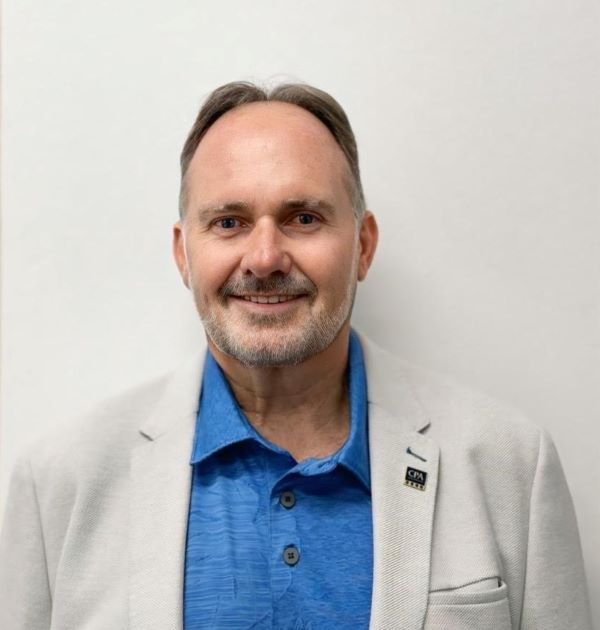
Christopher is a future-focused educator and global business leader committed to reshaping how people learn, upskill and succeed. Driven by innovation, he combines technology, digital learning design and real-world industry insight to build powerful, future-ready education solutions.
As Director General of the World Certification Institute and an experienced Company Director, he leads international initiatives that set global standards, strengthen professional capability, and open new pathways for learners across Asia and beyond. His work bridges education and enterprise — helping organisations transform their workforce and individuals gain the skills and confidence to thrive in a changing world.
With qualifications including BCom, GradDipEd, MBA, FCPA, WCMP and FWCI, I bring deep expertise in business strategy, financial governance and competency-based learning.
Christopher is passionate about using technology to enhance the learning journey, create equitable access to skills, and promote lifelong learning for all.
Our mission is simple: to empower people with the knowledge, tools and opportunities they need to succeed — today and into the future.
For any further details, please fill in the enquiry form below to reach us.
Have a question about this course? Complete the form below and our team will be in touch to assist with your enquiry.
Enquiry received
Your enquiry has been submitted successfully.
Our team will be in touch to assist with your enquiry.
You can now close this window.






Reviews
There are no reviews yet.